How country packs work
The country of a company is chosen once and decides its accounts, taxes, files, payroll and deadlines.
BizCortex supports eight countries: Germany, France, Spain, Austria, Switzerland, Sweden, Norway and Denmark. Each country is delivered as a country pack. The pack contains everything that differs between countries: the chart of accounts, the tax codes and VAT rates, the VAT return and its boxes, the statutory export and import files, the rules and legends printed on invoices, the electronic invoice formats, the public holidays, the payroll calculation and its filing files, the filing channels, the company identifiers and the default language.
The country is chosen once, when the company account is created, and cannot be changed later. In Administration, Settings, Company the country field is read only with the hint "Set when the company account is created." Everything else in BizCortex asks the pack what to do, so the same screens (for example Taxes, VAT return or Exports & imports) show the right content for your country.
Almost every filing works the same way in every country: BizCortex calculates the figures from your posted bookings, creates the official file or a worksheet, and you upload the file or type the figures into the portal of the authority. Only a few connections send data directly; each country page lists which ones are live and which are not available yet.
Who can use this
- Platform administrators (choose the country)
- Owner
- Admin
- Accountant (country settings)
Steps
1. Choose the country when the company is created
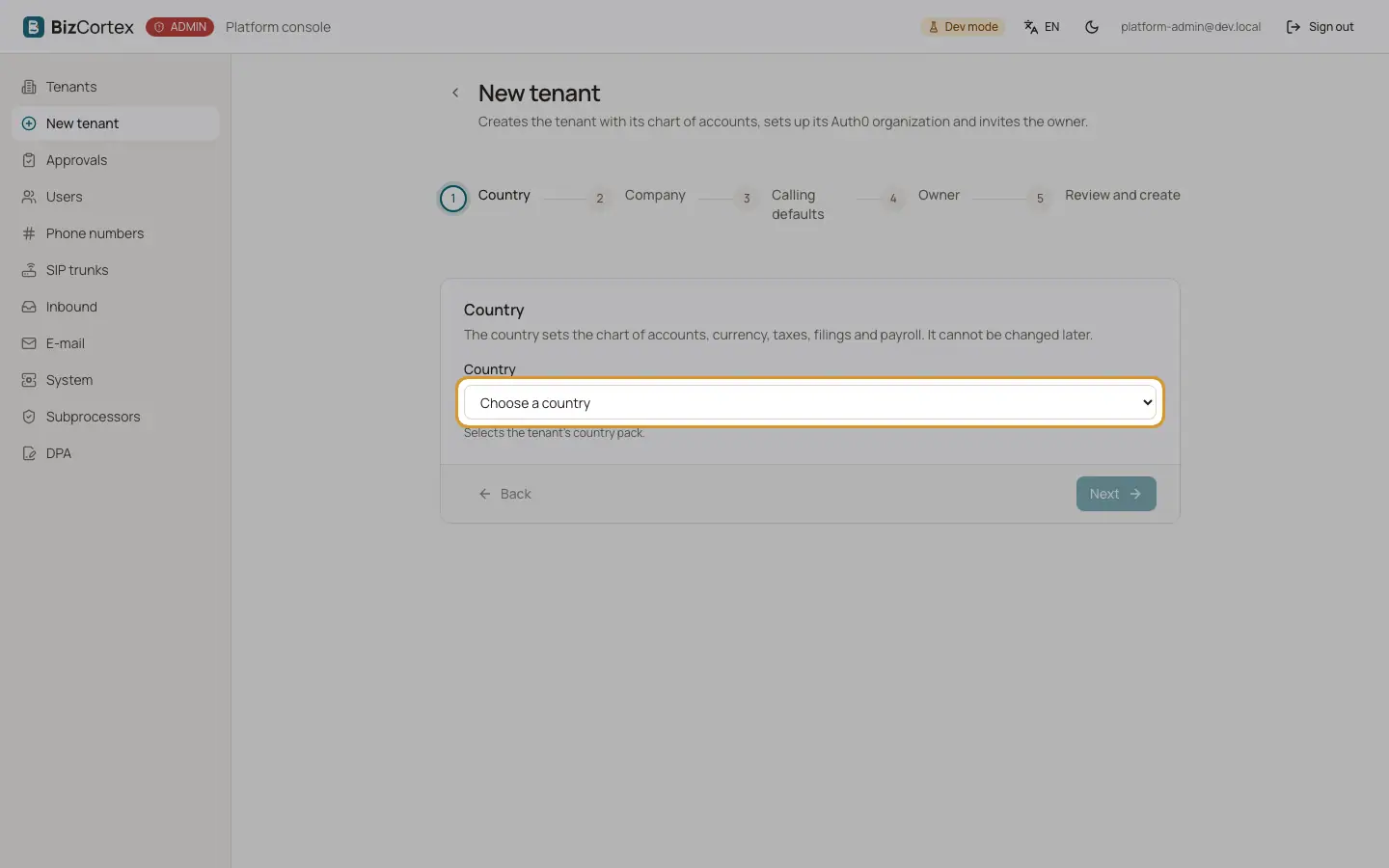
A platform administrator creates the company in the admin console. The first step of the wizard is "Country": it selects the country pack of the new company. As soon as you pick a country, the wizard shows its currency, its charts of accounts, its languages, its time zone and its payroll engine, and fills in the default chart and language. Example: Switzerland brings CHF, the KMU chart and the languages German, French and English.
2. What is set up automatically
When the company is created, BizCortex installs the chart of accounts of the country, the tax codes linked to the accounts and to the boxes of the VAT return, the fiscal year, the number ranges, the base currency and the public holidays. Nothing has to be imported by hand.
3. Fill in the company identifiers
Open Administration, Settings, Company. Besides the address and bank details, the form shows the identifiers of your country, for example SIREN and SIRET in France, NIF in Spain, UID in Austria and Switzerland, organisationsnummer in Sweden and Norway or CVR in Denmark. Each identifier is checked against its format (and check digit where one exists) when you save. Postcodes are also checked by country: five digits in Germany, France and Spain, four digits in Austria, Switzerland, Denmark and Norway, and "NNN NN" in Sweden.
4. Fill in the country settings
Below the company form you find the card "Country settings" followed by the name of your country. It holds the settings that only apply in that country, such as payment references, register numbers, filings and payroll. The labels are shown in the language of the country. Yes or no settings that can also be left open show the choice "Automatic": BizCortex then decides from your other data. The values are checked when you save; a wrong format shows the message "The format is not valid." If a country has no extra settings, the card says "This country has no additional settings."
5. Watch the deadlines
Every pack knows the statutory deadlines of its country (VAT return, EC sales list, payroll files, annual returns). They appear in the calendar, and the Advisor reminds you before each one: a VAT payment reminder before the VAT return is due, and a filing reminder before every other filing. A deadline that falls on a Saturday, Sunday or public holiday moves to the next working day according to the rules of the country.
6. Create the statutory files
The VAT return is under Finance, Taxes, VAT return (in Germany the advance VAT return). Audit files, EC sales lists, worksheets and migration imports are under Finance, Exports & imports, which only lists the files of your country. Payroll files are created on the payroll run in People, Payroll.
7. Upload the file and record the result
When you create a file with the option to submit it, BizCortex places it on the Filings timeline in Finance, Filings. Upload the file in the portal of the authority, then record the outcome (for example the receipt number) on the filing. Every exported file is archived and cannot be changed afterwards.
Fields and options
- Holiday subdivision
Shared by every country that has regions (the label is local, for example "Bundesland (Finanzamt)" or "Kanton"). The region of your competent tax office. Its regional public holidays then also move due dates. Empty means only the national holidays count. Sweden and Denmark have no regions, so the field is not shown there.
- EC sales list
Shared by every country (local labels such as "Zusammenfassende Meldung abgeben" or "Periodisk sammanställning"). Says whether the company files EC sales lists. "Automatic" (the default) means yes as soon as a VAT ID is entered in the company data.
- VAT registered
Shared by every country. On by default. Switch it off when the company is not registered for VAT; the VAT return deadlines are then removed from the calendar.
Tips
- Enter the VAT ID in the company data early: it switches on the EC sales list deadlines and the checks on intra EU invoices.
- Set the holiday subdivision to the region of your tax office, so that regional holidays are taken into account for due dates.
- The company currency and the chart of accounts come from the country. Foreign currency invoices are still possible.
Good to know
- The country of a company cannot be changed after creation. A company in another country needs its own company account.
- Every payroll calculation outside Germany shows the banner "Review required" until a local payroll expert has signed it off. Check every payslip before you pay or file it.
- Where the VAT box mapping of a country has not been signed off by a tax professional yet, the VAT return page says so. Check the values before you file.
- Most filings are a file export followed by an upload in the portal of the authority. Direct transmission exists only where the country page says so.
Related
- Country settings
Settings that only apply in your country, such as payment references, register numbers, filings and payroll.
- Country packs
How BizCortex adapts accounting, tax and invoicing to the country of your company.
- Germany
SKR03 or SKR04, advance VAT return through ELSTER, DATEV, XRechnung and ZUGFeRD, German payroll.
- France
PCG chart, CA3 and CA12 worksheets, FEC, Factur X and the Plateforme Agréée, DSN payroll file.
- Spain
PGC PYMES chart, Modelo 303 file, 349, 390, VAT record books, Facturae, VERI*FACTU, RED and Modelo 190.
- Austria
EKR chart, UVA and ZM as FinanzOnline XML, SAF T AT, BMD, ebInterface, ELDA payroll files.
- Switzerland
KMU chart in CHF, MWST return as eCH 0217 XML, QR bill, Swiss payment files, UID register, Swiss payroll.
- Sweden
BAS chart in SEK, momsdeklaration as eSKD file, periodisk sammanställning, SIE 4, Peppol, AGI payroll file.
- Norway
NS 4102 chart in NOK, mva melding XML, SAF T Financial, EHF, KID references, a melding payroll file.
- Denmark
Standardkontoplan in DKK, momsangivelse worksheet, EU salg uden moms, SAF T DK, OIOUBL, FIK, eIndkomst.