Country settings
Settings that only apply in your country, such as payment references, register numbers, filings and payroll.
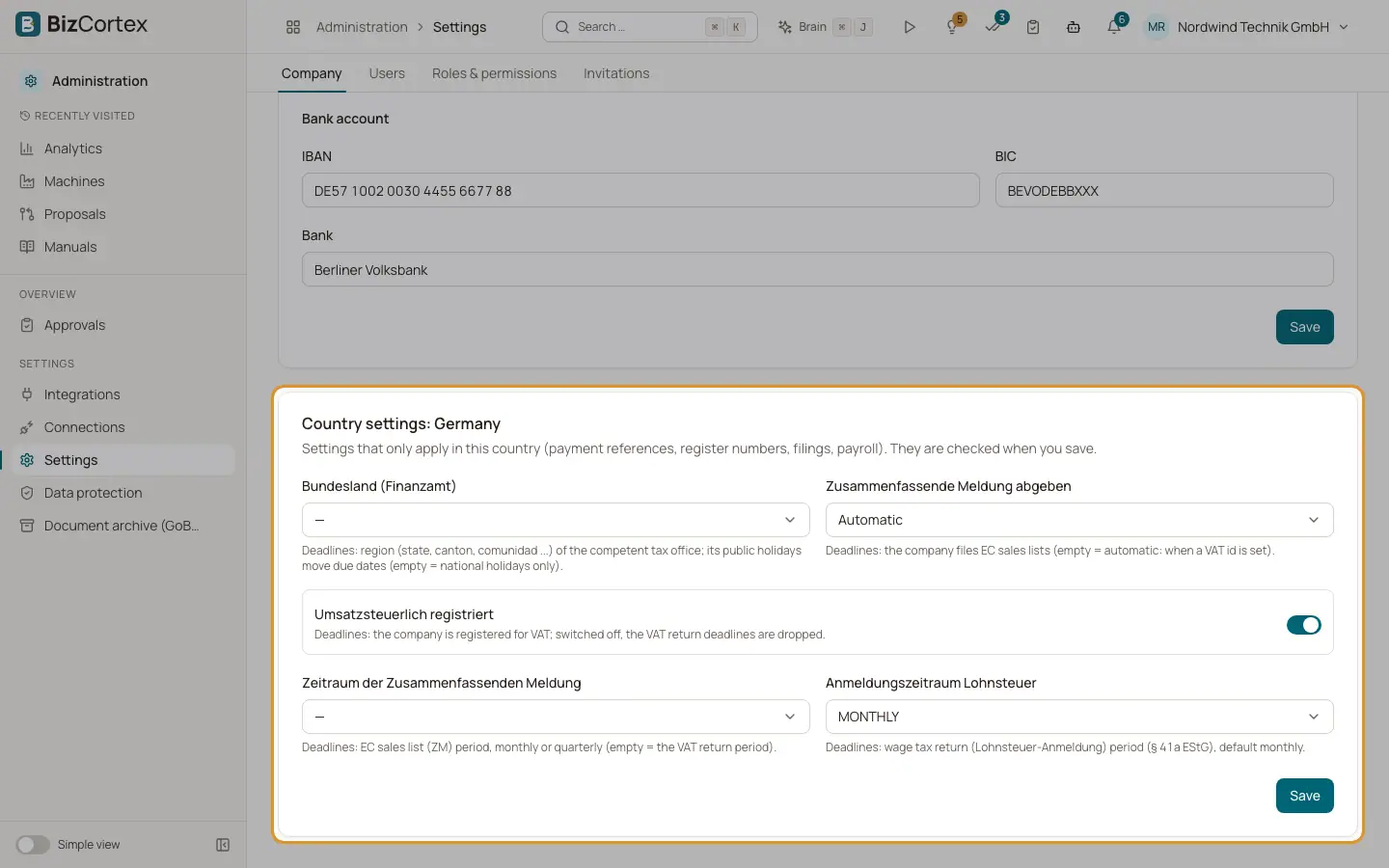
Below the company master data, the "Company" tab shows a second card called "Country settings" followed by the name of your country. It holds settings that only exist in that country. The card is hidden when your country has no additional settings.
Examples are the QR IBAN in Switzerland, Bankgiro, Plusgiro and F skatt in Sweden, the KID algorithm in Norway, the FI creditor number in Denmark, the ELDA numbers in Austria and the periods of the recapitulative statement and the wage tax return in Germany.
Who can use this
- Everyone can view
- Owner, Admin and Accountant can edit
Steps
1. Open the card
Open "Settings", the "Company" tab, and scroll down to the "Country settings" card.
2. Fill in the fields
Fields that show "Automatic" are derived by BizCortex unless you set a value yourself.
3. Save
Save the card. The values are checked when you save. A field with a wrong format shows "The format is not valid."
Tips
- Fill in these settings before you send your first filing or run payroll, because both use them.
Related
- Company master data
Legal name, address, tax numbers, register entry and bank details that appear on your invoices.
- How country packs work
The country of a company is chosen once and decides its accounts, taxes, files, payroll and deadlines.