Home
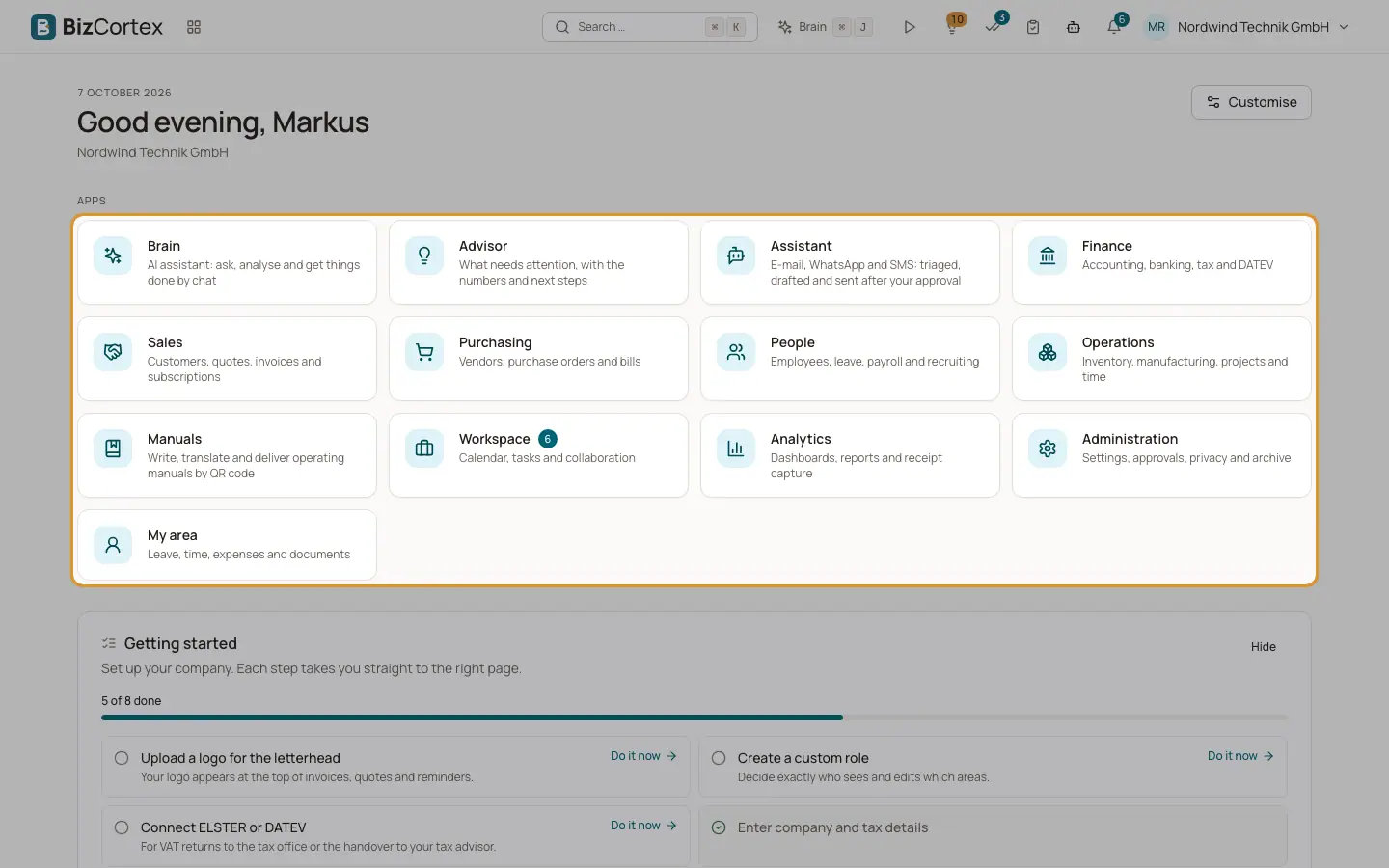
The start page: greeting, app tiles and widgets.
Home is the first page after sign in. You reach it at any time by clicking the BizCortex logo or by choosing Home in the app switcher.
At the top you see today's date, a greeting ("Good morning", "Good afternoon" or "Good evening" with your first name) and the name of the current company. Below it, the section "Apps" shows one tile per app you may open. Below the tiles you find the widgets.
Who can use this
- Everyone
Steps
1. Open an app
Click an app tile. Most tiles open the overview page of the app. Home, Brain, Advisor and My area open directly.
2. Read the badges
The Administration tile shows how many approvals are waiting for you. The Workspace tile shows how many of your tasks are due today.
3. Use the widgets
The widgets below the tiles show key figures, your approvals, recent activity and more. Click an entry to open it.
4. Personalise
Click "Customise" at the top right to arrange the tiles and choose your widgets.
Tips
- Pinned apps are always shown first.
- Only apps that your company has booked and that your role can open are shown.
Related
- Customising Home
Pin, hide and reorder app tiles and choose, move and resize widgets.
- Home widgets
Every widget you can place on Home and what it shows.