Home widgets
Every widget you can place on Home and what it shows.
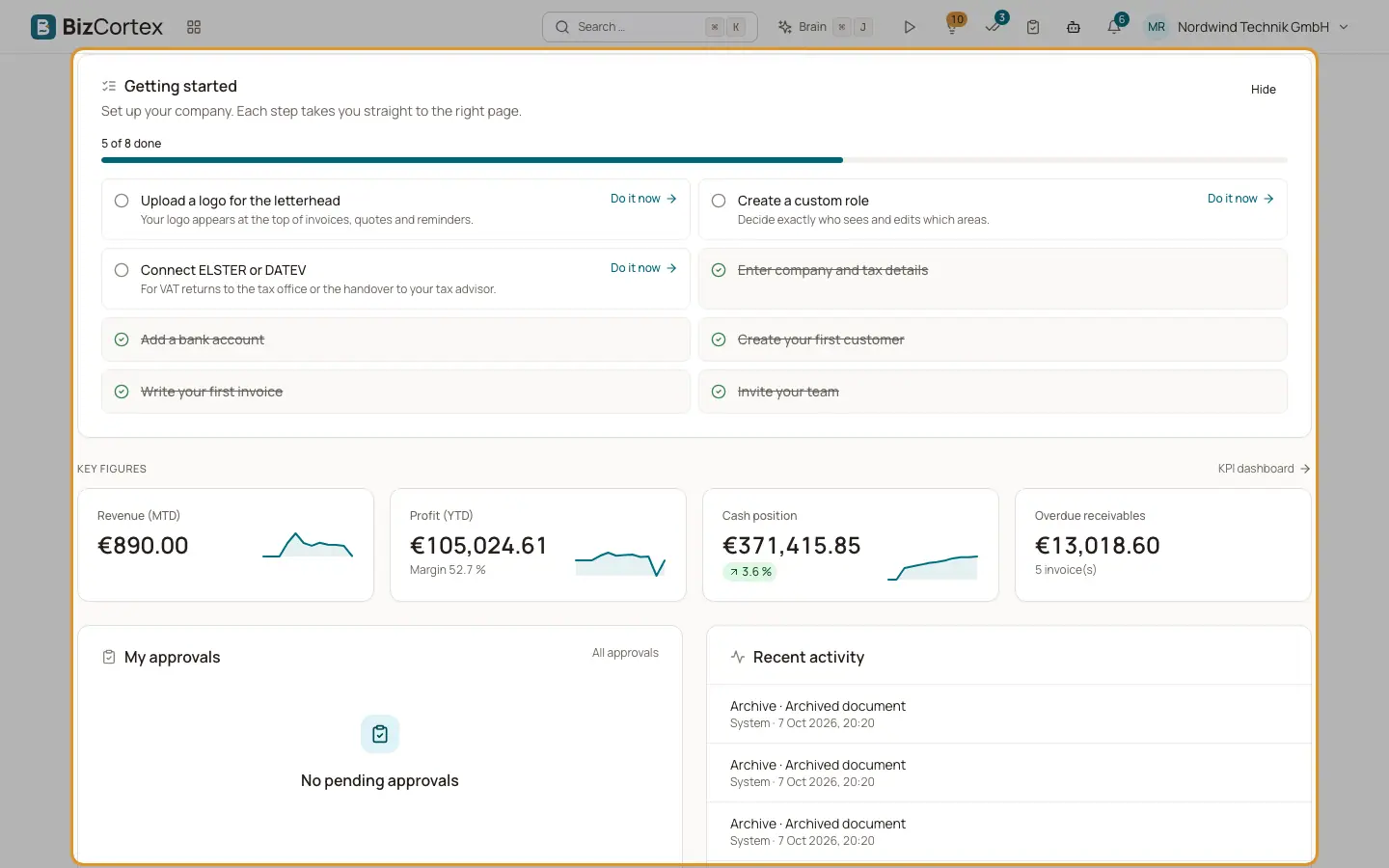
The built in layout of Home contains, in this order: the setup checklist (for owners and administrators), the key figures, My approvals, Recent activity, and the widgets of your booked apps. Each widget only appears when your role may see its data and its package is booked.
Who can use this
- Everyone
Fields and options
- Getting started
The steps to set up your company. Owners and administrators only.
- Key figures
Your company's most important figures as four tiles. BizCortex prefers Revenue (MTD), Profit (YTD), Cash position, Overdue receivables, Quote pipeline, Headcount, Stock value and My pending approvals, and takes the first four you may see.
- My approvals
Documents waiting for your approval, with a link "All approvals". Shows "No pending approvals" when nothing waits.
- Recent activity
What happened in the company lately. Members who may read the audit log see the six latest changes in the company; everyone else sees their own latest notifications under "Updates".
- Advisor
The most important Advisor insights with counts of critical items, warnings and info, for the side of the Company | Product switch you are on. Shows "All clear." when there is nothing to do. Needs the Brain package.
- Today
The Assistant overview: approvals, replies, commitments due and hints. Shows "Mailbox not connected yet." until your mailbox is connected. Needs the Assistant package.
- My tasks today
Your tasks due today. Needs the Workspace package.
- Upcoming events
Your next events from the calendar. Needs the Workspace package.
- Calling readiness
What is still missing before the first call. Needs the Sales calling package.
- Calls today
Today's calls at a glance. Needs the Sales calling package.
- Key figures, charts and lists
Any widget of the KPI dashboard: a single key figure, a chart, a list, pending approvals, shortcuts or a saved report. Needs the Analytics package.
Good to know
- As long as no Workspace widget is available, Home shows a placeholder "Tasks and messages" that explains what will appear there.
Related
- Customising Home
Pin, hide and reorder app tiles and choose, move and resize widgets.
- Dashboard widget catalog
The key figures, charts and lists you can add to the dashboard or to Home.