The admin console
What the admin console is, who can use it and how it differs from BizCortex itself.
The admin console is a separate application at admin.bizcortex.de. Operators of the platform use it to work across all tenants (companies). Tenant users never see it, whatever their role in a company.
Creating a company is only possible in the console. BizCortex itself has no "create company" flow: a person who signs in without a membership is asked to request an invitation from their administrator.
Who can use this
- Platform operators with the platform_admin role
Steps
1. Navigate
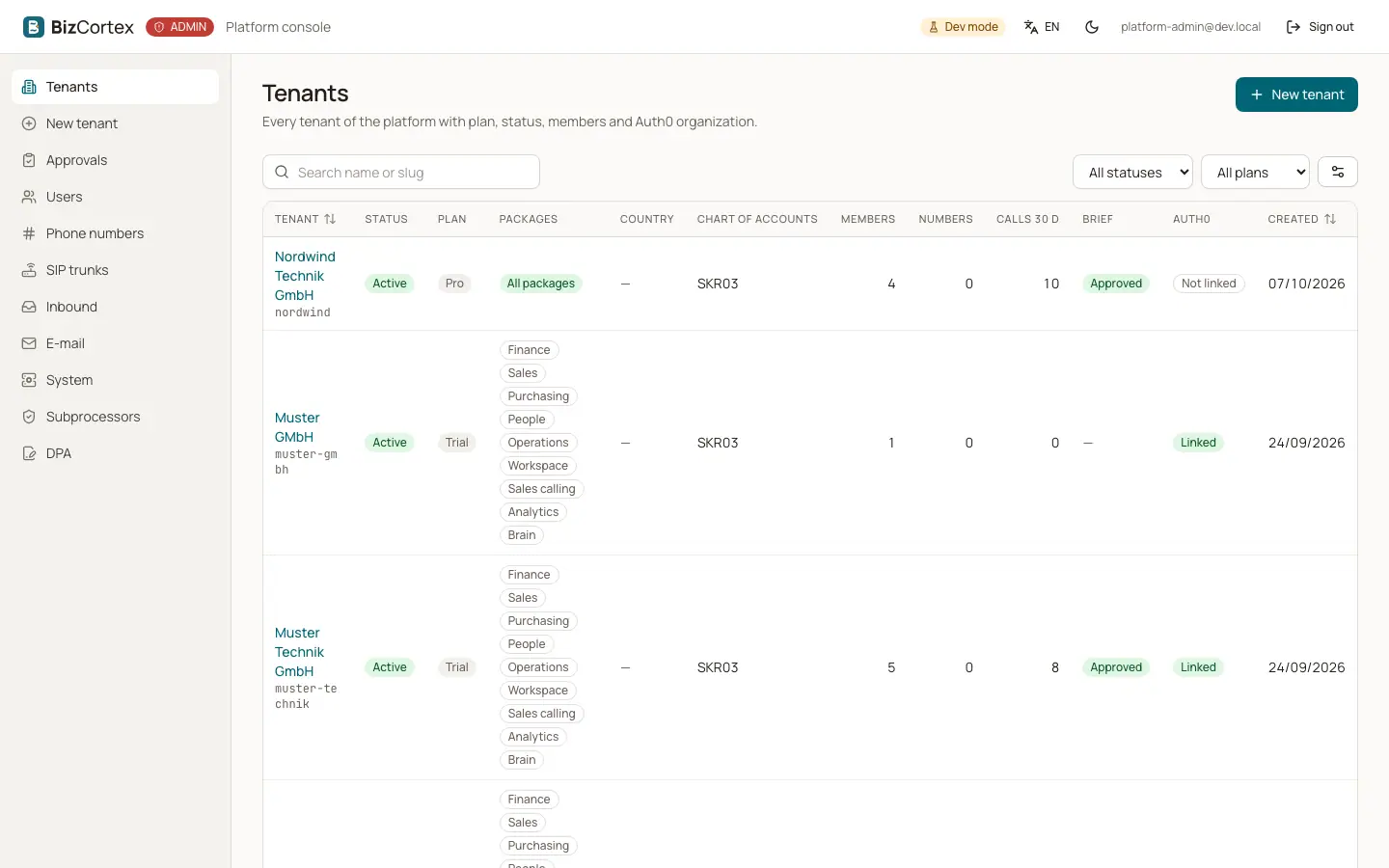
The sidebar "Console" lists Tenants, New tenant, Approvals (brief reviews), Users, Phone numbers, SIP trunks, Inbound, Email, System, Subprocessors and DPA.
2. Theme and sign out
Use the header buttons to switch between light and dark mode and to sign out. A "Dev mode" badge appears in development installations.
Good to know
- Tenant isolation does not apply in the console: it works across tenants on purpose. Every change to the data of a tenant is still written to the audit log of that tenant, with the operator as the actor and marked as coming from the platform.
- The console is available in German, English, French, Spanish, Swedish, Norwegian and Danish.
Related
- Signing in to the console
Sign in with your platform account. Only accounts with the platform_admin role get access.
- Tenant list
Every tenant of the platform with plan, status, packages, members and Auth0 organization.