Settings and limits
Plan, billing, concurrency, calling windows, calling defaults and the active switch of a tenant.
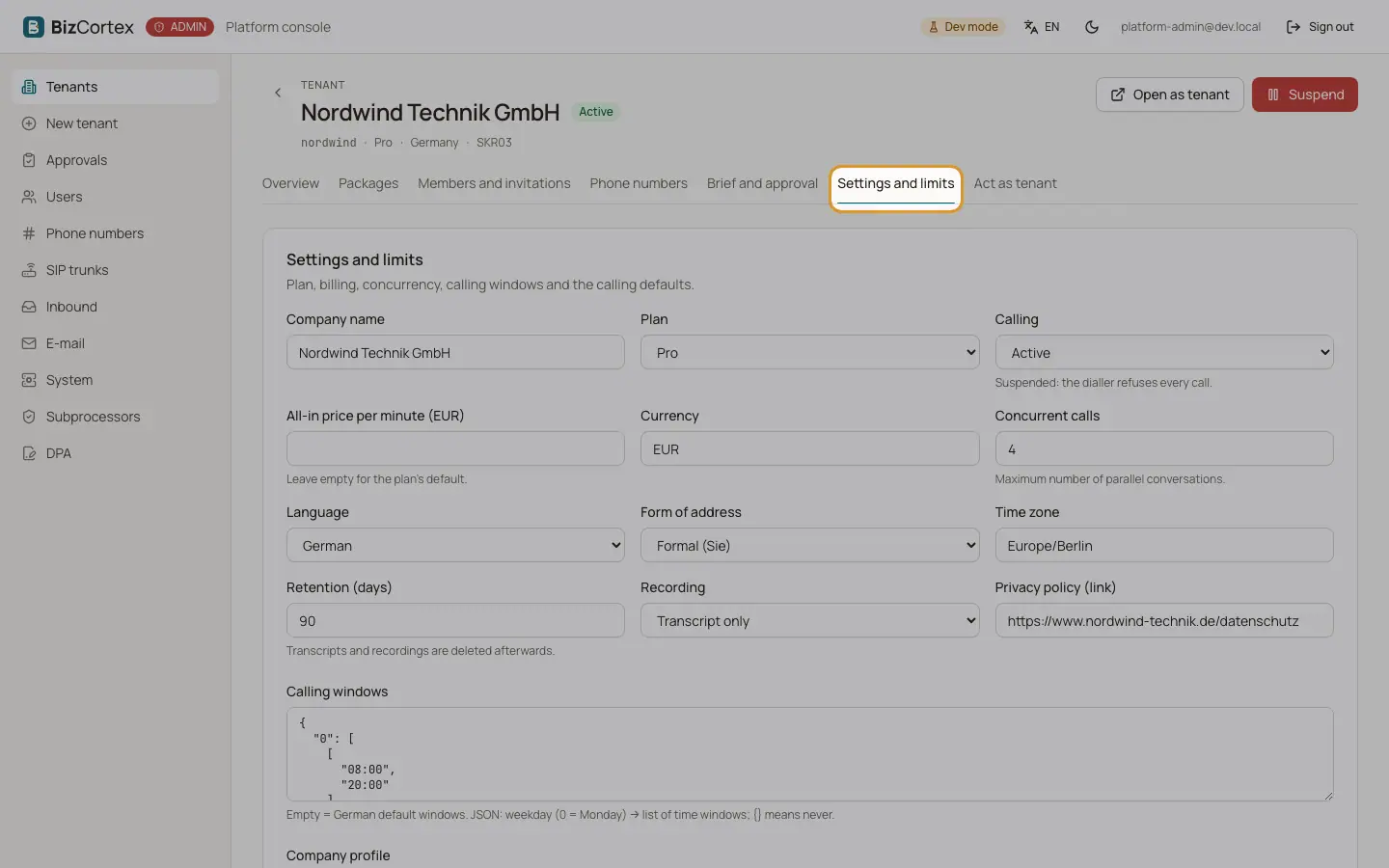
Open the tenant and the tab "Settings and limits". Only the fields you change are saved.
Who can use this
- Platform operators
Fields and options
- Name, Plan, Currency
The tenant name, the commercial plan and the billing currency.
- Calling
Active or Suspended. Suspended: the dialler refuses every call.
- All in price per minute (EUR)
Leave empty for the default of the plan.
- Concurrent calls
Maximum number of parallel conversations.
- Retention (days)
Transcripts and recordings are deleted afterwards.
- Recording
Recording (with consent), Transcript only or Outcome only.
- Calling windows
German default windows (weekdays, no public holidays) or custom windows as JSON. Empty restores the German default.
- Language, Form of address, Time zone
Defaults for the calling agent.
- Privacy policy (link), Company profile, Conversation etiquette notes
What the agent and the emails use.
- Tenant active
A deactivated tenant disappears from BizCortex and can no longer sign in.
Related
- Suspending and deactivating a tenant
Stop the calling side of a tenant, or switch the whole tenant off.