Analytics and paper copy requests
See how manuals are used, which questions stay unanswered and handle paper copy requests.
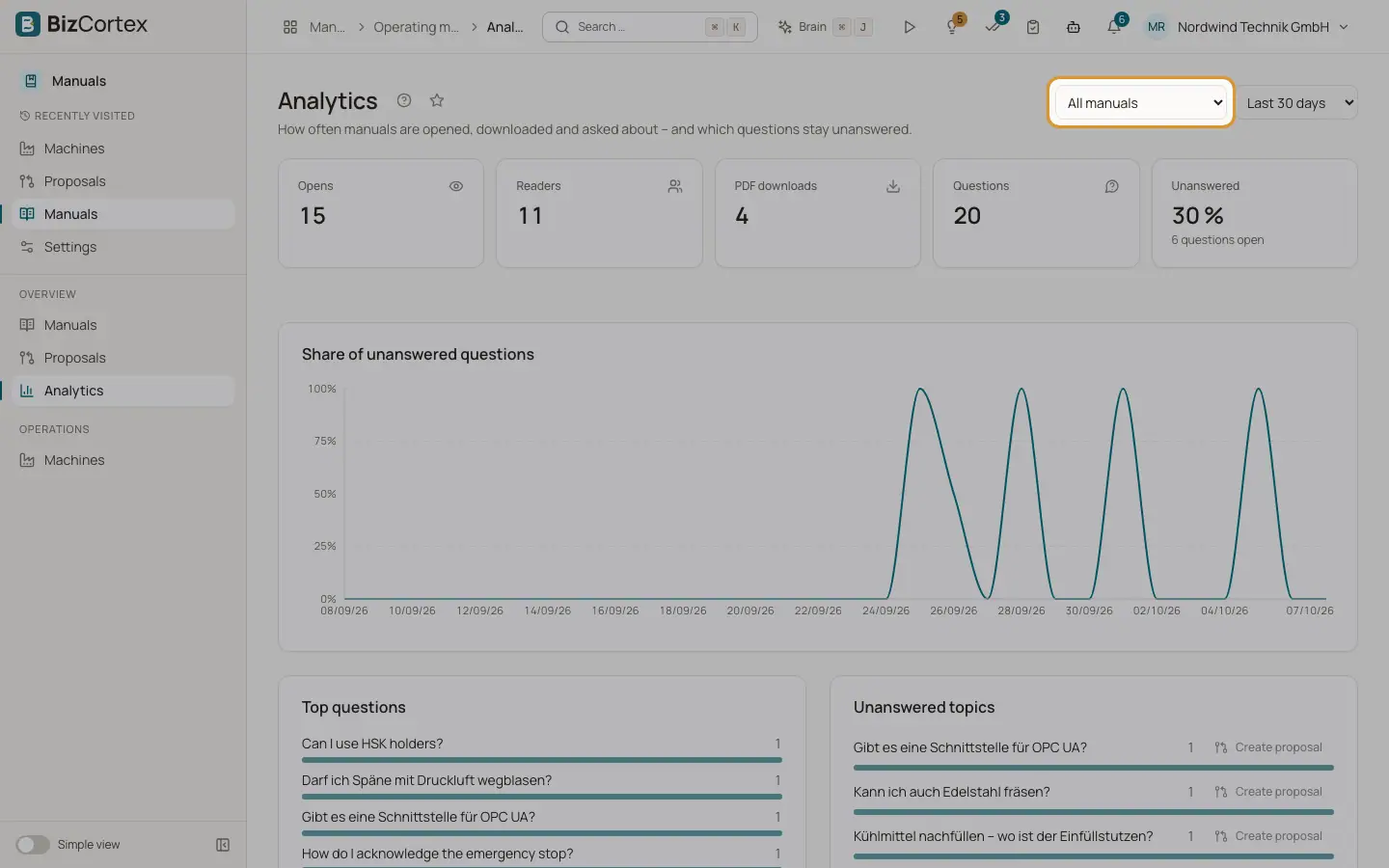
Analytics shows how often manuals are opened, downloaded and asked about, and which questions stay unanswered. It also lists the paper copy requests that readers sent from the public reader.
Who can use this
- Owner, Admin, Employee, Accountant, Purchase, Viewer (Manuals analytics read permission)
Steps
1. Choose manual and period
Open Analytics in the sidebar. Choose a manual or "All manuals" and a period: last 7, 30, 90 or 365 days. The default is 30 days.
2. Create a proposal from unanswered topics
Choose a manual first. Under "Unanswered topics" click "Create proposal". BizCortex groups the questions into gap proposals and shows how many were created. If the manual has no questions source yet, it is created for you.
3. Handle paper copy requests
Under "Paper copies on request" you see each request. Send the printed manual and click "Mark as sent".
Fields and options
- Opens
How often manuals were opened.
- Readers
Distinct readers, counted by anonymous daily hashes.
- PDF downloads
How many PDFs were downloaded.
- Questions
How many chat questions were asked.
- Unanswered
The share of questions without an answer, in percent, with the number of open questions.
- Unusual mass downloads
An alert when one anonymous network downloaded more than 20 PDFs within 24 hours, with time, count and a short hash prefix.
- Share of unanswered questions
A chart of the unanswered share over time.
- Top questions
The questions asked most often.
- Unanswered topics
Groups of questions the manual could not answer. When there are none, you see "No open questions".
- Most cited sections
The sections that chat answers cite most often.
- Access by version, Access by customer, Languages
How access is distributed over versions, customers and languages.
- Paper copy columns
Received, Requested by, Delivery address, Language, Due and Status (Open, Sent, Cancelled).
Good to know
- A paper copy must be provided free of charge. The due date is 14 days after the request.
- "Create proposal" needs the Manuals source write permission (Owner and Admin by default). "Mark as sent" needs the Manuals manual write permission.
Related
- Reader chat: questions about the manual
Let readers ask questions that are answered only from the released manual, with sources.
- Proposals: reviewing suggested changes
Review the evidence and the changes of each proposal, edit it, and apply or reject it.
- The public reader: what readers see after scanning
What an anonymous person sees when they scan the QR code on a machine.