Translations tab: AI translation and review
See the translation state of every page, translate with AI and review translations before release.
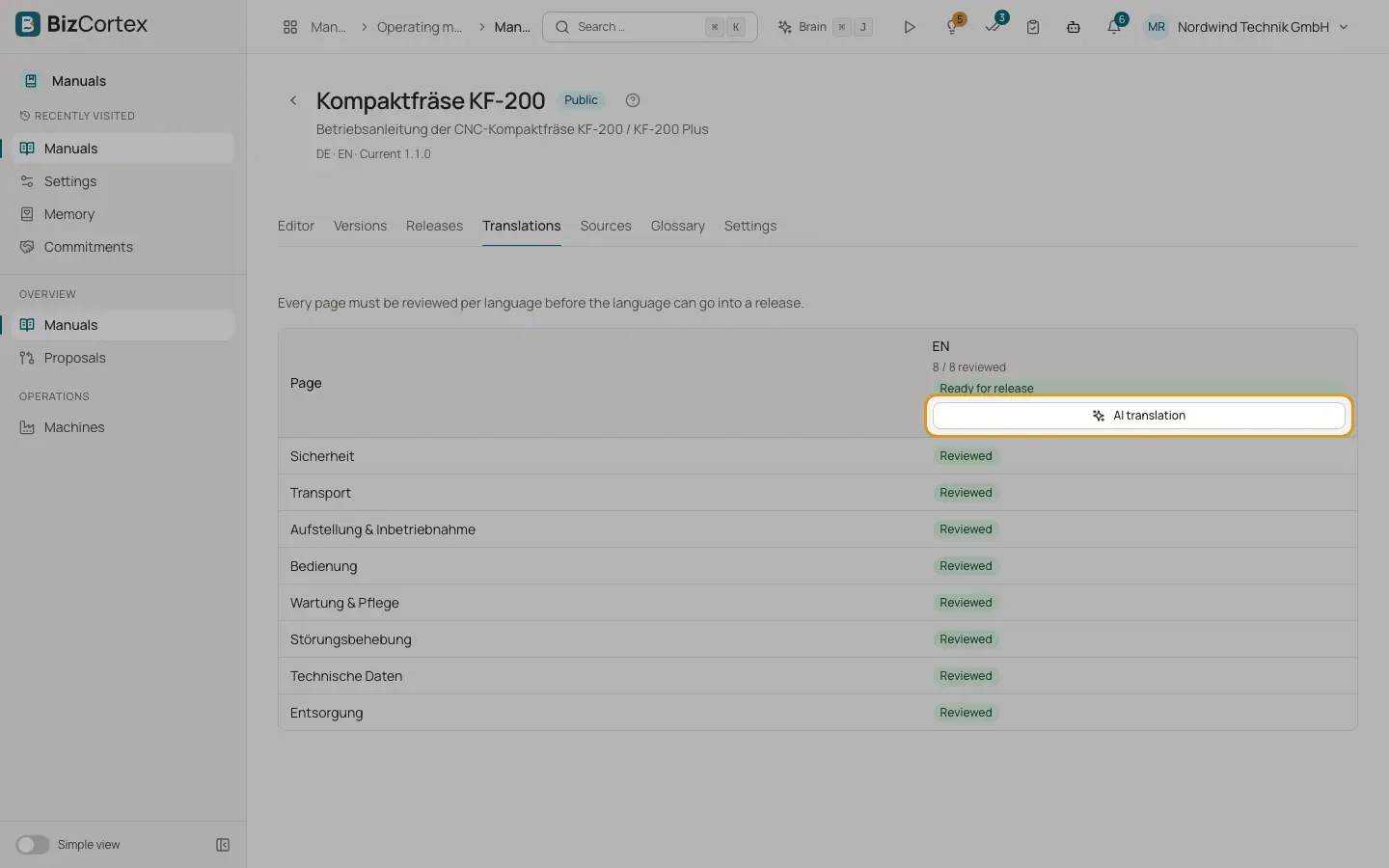
The Translations tab shows a matrix with one row per page and one column per target language. Every page must be reviewed per language before that language can go into a release. Each column header shows how many pages are reviewed and whether the language is "Ready for release" or "Not ready for release".
Who can use this
- Owner, Admin, Employee to translate
- Owner, Admin to mark a translation as reviewed
Steps
1. Start an AI translation
Click "AI translation" in the column of a language. The dialog shows the scope: pages, text segments, characters, model calls and estimated tokens. Missing and outdated pages are translated. Tick the option to also translate pages that are already reviewed only if you want those translated again. Click "Start translation".
2. Wait for the result
BizCortex shows how many pages are being translated. The translation runs in the background. Translated pages get the state AI draft.
3. Review a page
Click a cell in the matrix. The review opens with the original on the left and the translation on the right. Edit the translation directly; changes are saved automatically. If the original changed since the translation, open "Changes in the original since the translation" to see what changed. The list "Glossary terms on this page" shows the terms that must be translated consistently.
4. Approve or send back
Click "Mark as reviewed" when the translation is correct, or "Back to draft" if it needs more work.
Fields and options
- Original
The page is in the source language.
- Missing
There is no text in this language yet.
- Draft
A person wrote or edited the translation, and it is not reviewed yet.
- AI draft
The AI translation wrote the text. A person must review it.
- In review
The translation is being reviewed.
- Reviewed
A reviewer approved the translation. Only reviewed pages can be released.
- Outdated
The original changed after the translation was made or reviewed. The page must be translated or reviewed again.
Tips
- Maintain the glossary first. The AI translation uses the glossary, keeps signal words and keeps the page structure, images, links and formatting.
- Code blocks are never translated.
Good to know
- The AI translation runs on OpenAI. A person must review every page afterwards.
- If a manual has no target languages, the tab shows "No target languages". Add a language in Settings.
- Applying a change proposal marks the translations of that page as Outdated.
Related
- Glossary tab: consistent terms
Define how technical terms and signal words are translated in every language.
- Releases tab: publishing a version
Freeze the manual as a numbered version, run the checks and publish the PDFs.
- Settings tab: manual settings
Name, access, retention, branding, manufacturer, reader chat, access code and languages of a manual.