Inbox
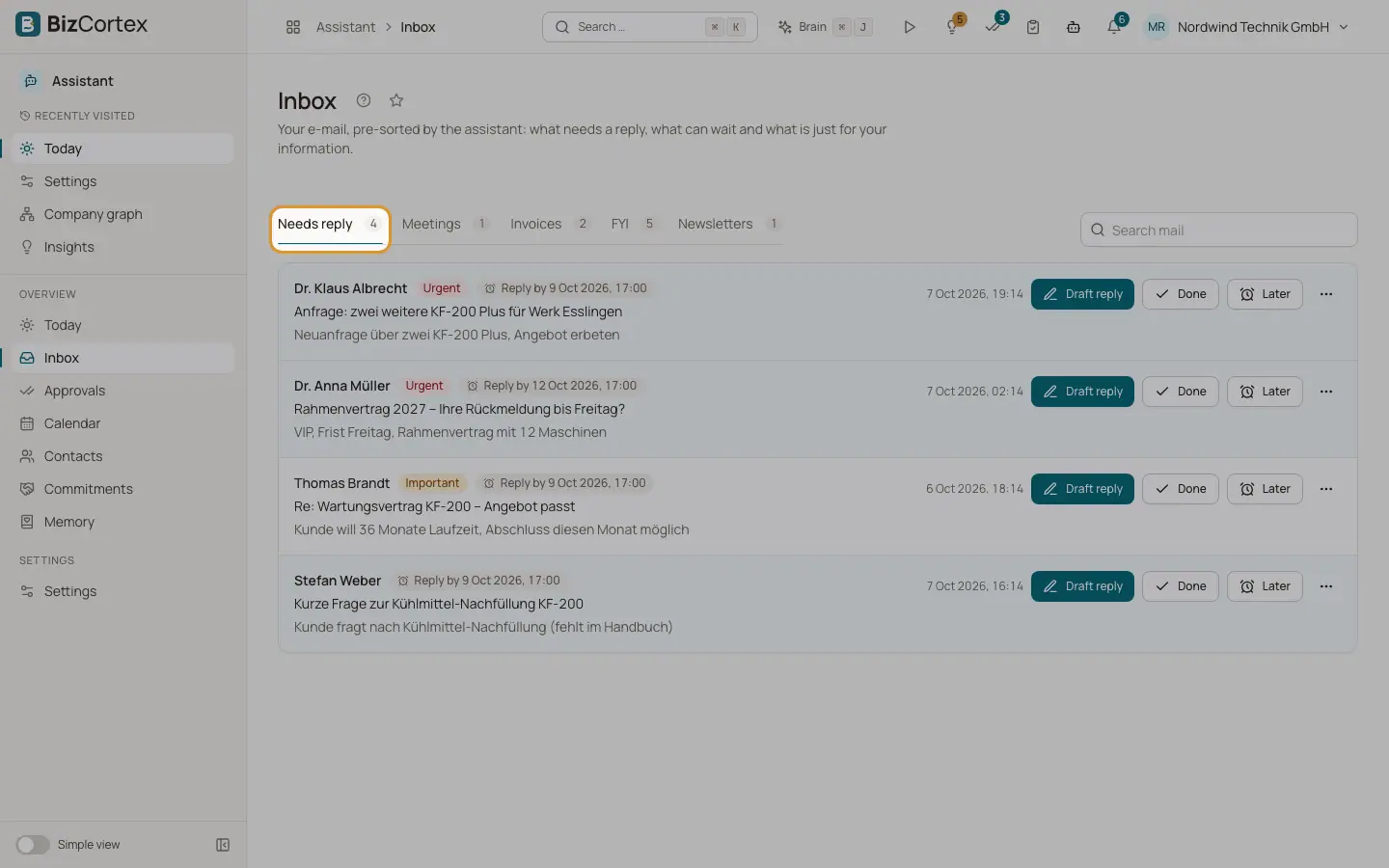
Your mail, sorted by the Assistant into Needs reply, Meetings, Invoices, FYI and Newsletters.
The Inbox shows the mail from your connected mailbox, already sorted. The Assistant first applies fixed rules (for example newsletters, automatic replies and meeting invitations). Then the AI model reads the rest and decides the category, priority and whether you need to reply.
Every mail is also checked for manipulation attempts. A flagged mail is marked "Possible manipulation attempt, approval in the app only". No automatic draft is created for it, and anything based on it is high risk.
Who can use this
- Owner
- Admin
- Sales
- Accountant
Steps
1. Pick a tab
Choose "Needs reply", "Meetings", "Invoices", "FYI" or "Newsletters". Use "Search mail" to search.
2. Draft a reply
Click "Draft reply" on a mail. The message "The draft is waiting for your approval." appears. Click "Open approval" to review it. A mail that already has a draft shows "Draft waiting for your approval".
3. Mark as done
Click "Done" when you have handled a mail. It leaves the open list.
4. Snooze
Click "Later" and choose when to see it again: "This evening" (18:00), "Tomorrow morning" (08:00), "On Monday" (08:00) or "In a week".
5. Move or open in Outlook
Open "More actions" to move the mail to another tab if it was sorted wrongly, or click "Open in Outlook".
Fields and options
- Needs reply
Mail that needs your answer. Shows "Reply by" with a date when the Assistant found one.
- Meetings
Invitations, updates and cancellations.
- Invoices
Mail with an electronic invoice (XRechnung or ZUGFeRD) or a PDF from a known vendor. "Invoice imported" means it was passed to incoming invoices.
- FYI
Mail just for your information, including automatic replies.
- Newsletters
Mailing lists and bulk mail.
- Priority
Low, Normal, Important or Urgent.
- Has attachments
The mail carries files.
- Unknown sender / (no subject)
Shown when the sender or subject is missing.
Tips
- Mail from a contact you muted is always sorted as FYI.
- Moving a mail to another tab helps you keep the list right; the change is saved on the mail.
Good to know
- The Assistant reads at most about 6,000 characters of each mail, without quoted history and footers.
- When your daily AI limit is used up, sorting continues with the fixed rules only.
- Invoices are passed to incoming invoices only when the company allows it (the switch for routing electronic invoices on the Company tab) and you hold the incoming electronic invoice write permission. A personal switch for this is not available in the settings screens yet.
- Mail content is kept for at most 30 days, mail metadata for at most 12 months.
Related
- Approvals
Review, edit, approve or reject everything the Assistant wants to send.
- Approval risk rules
Which actions are high risk and where each kind of action can be approved.
- Settings: Company
Company wide switches and usage counts for administrators, never anyone's content.