Insight cards and their actions
What an insight card shows and everything you can do with it.
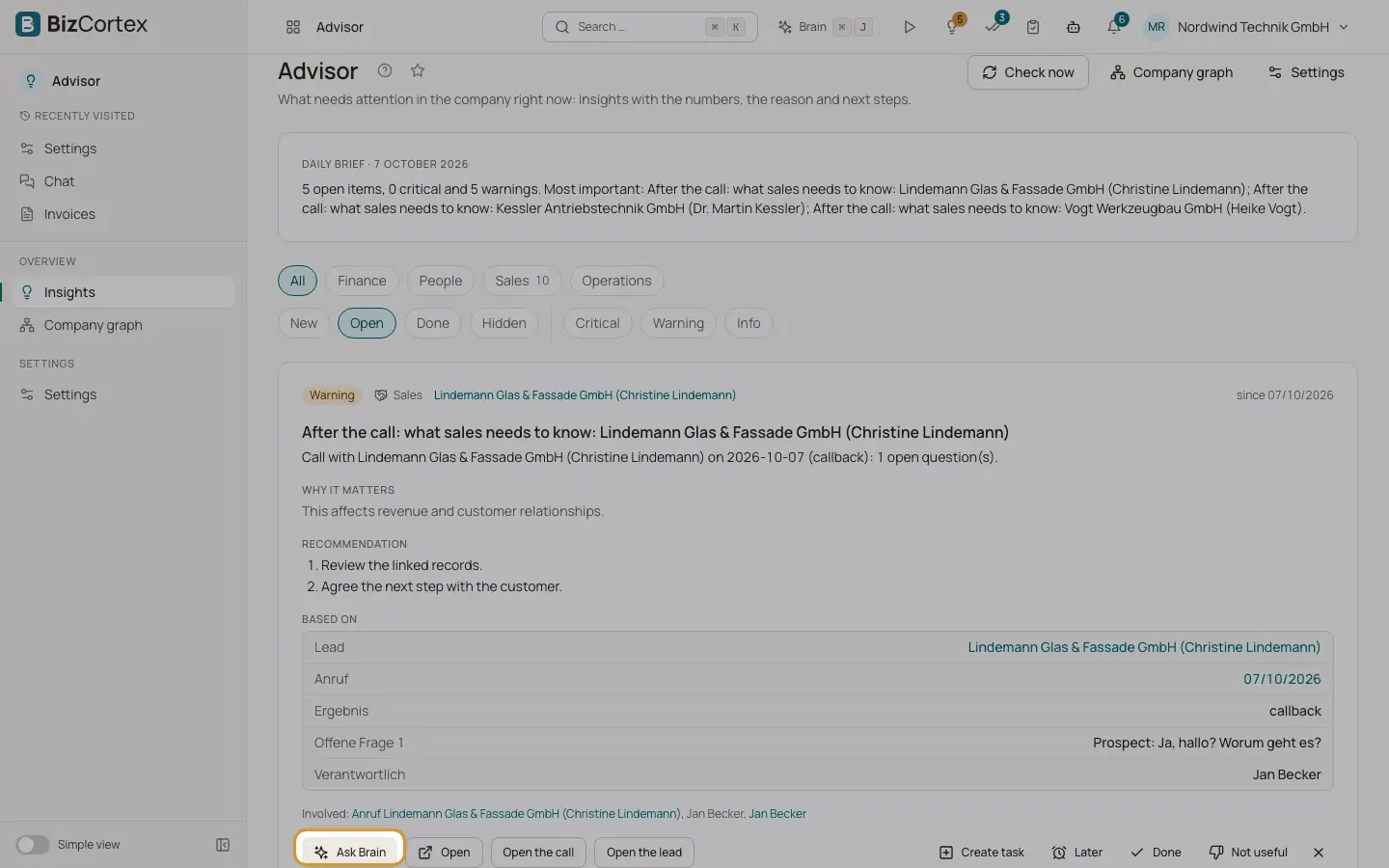
Each insight is a card. It follows the same order every time: the fact, why it matters, the recommendation, and the evidence it is based on. The buttons at the bottom let you act on it directly.
Who can use this
- Owner
- Admin
- Accountant
- Sales
- Purchase
- HR Manager
- Viewer
Steps
1. Ask Brain
Click "Ask Brain". The Brain panel opens and asks Brain to explain the insight and suggest next steps.
2. Open
Click "Open" to go to the record the insight is about, for example the customer, the vendor or the employee.
3. Suggested actions
Some insights offer ready actions such as "Start a dunning run", "Review replenishment", "Schedule a 1:1" or "Open VAT return". An action either opens the right page or asks Brain to prepare the change. Prepared changes show as a confirmation card in Brain, so you still confirm them.
4. Create task
Click "Create task". Enter the Title, the date in "Due on" and the Assignee (Myself or a colleague), then click "Create task". The task is linked to the insight and appears in Tasks with the fact, the recommendations and a link back. Tasks from critical insights get high priority.
5. Later
Click "Later" and choose "Tomorrow", "Next week" or "Pick a date …". The insight leaves the list and comes back on that day at 8 am. The date must be in the future.
6. Done
Click "Done" when you have handled it. You see "Marked as done".
7. Not useful
Click "Not useful", choose a Reason and optionally write "What should we know?", then click "Send feedback".
8. Hide
Click the Hide button to remove the insight from your list. You see "Insight hidden".
Fields and options
- Severity badge
Critical, Warning or Info.
- Since
The date the situation was first found, and "N times" when it came back after being resolved.
- Status badges
New, "snoozed until" a date, Done or Hidden.
- Why it matters
A short explanation of the impact.
- Recommendation
One to three next steps.
- Based on
The evidence: each number, date or name the insight uses, often with a link to the record.
- Involved
Other people or records concerned, for example the second person in an absence overlap.
Good to know
- An insight you closed (Done or Hidden) comes back for you only when its severity rises, when its money impact grows by more than 25 %, or when the situation returns after it was resolved.
- Feedback reasons: "Not relevant to me", "The numbers or statements are wrong", "I already knew this", "Comes up too often" and "Other reason". Feedback changes the ranking of this kind of insight for your whole company right away.
Related
- Confirming what Brain proposes
How proposed changes work: confirmation cards, statuses, expiry and the extra safety step.
- The insight feed and its filters
Browse, filter and page through your insights.