Public document links
What customers see when they open the link in a document email.
Invoices get a secret public link when they are finalized; quotes and orders get one when they are sent. The link is in the document email. Anyone with the link can open the document without signing in, so treat it like the document itself.
Who can use this
- Customers (no account needed)
Fields and options
- Header
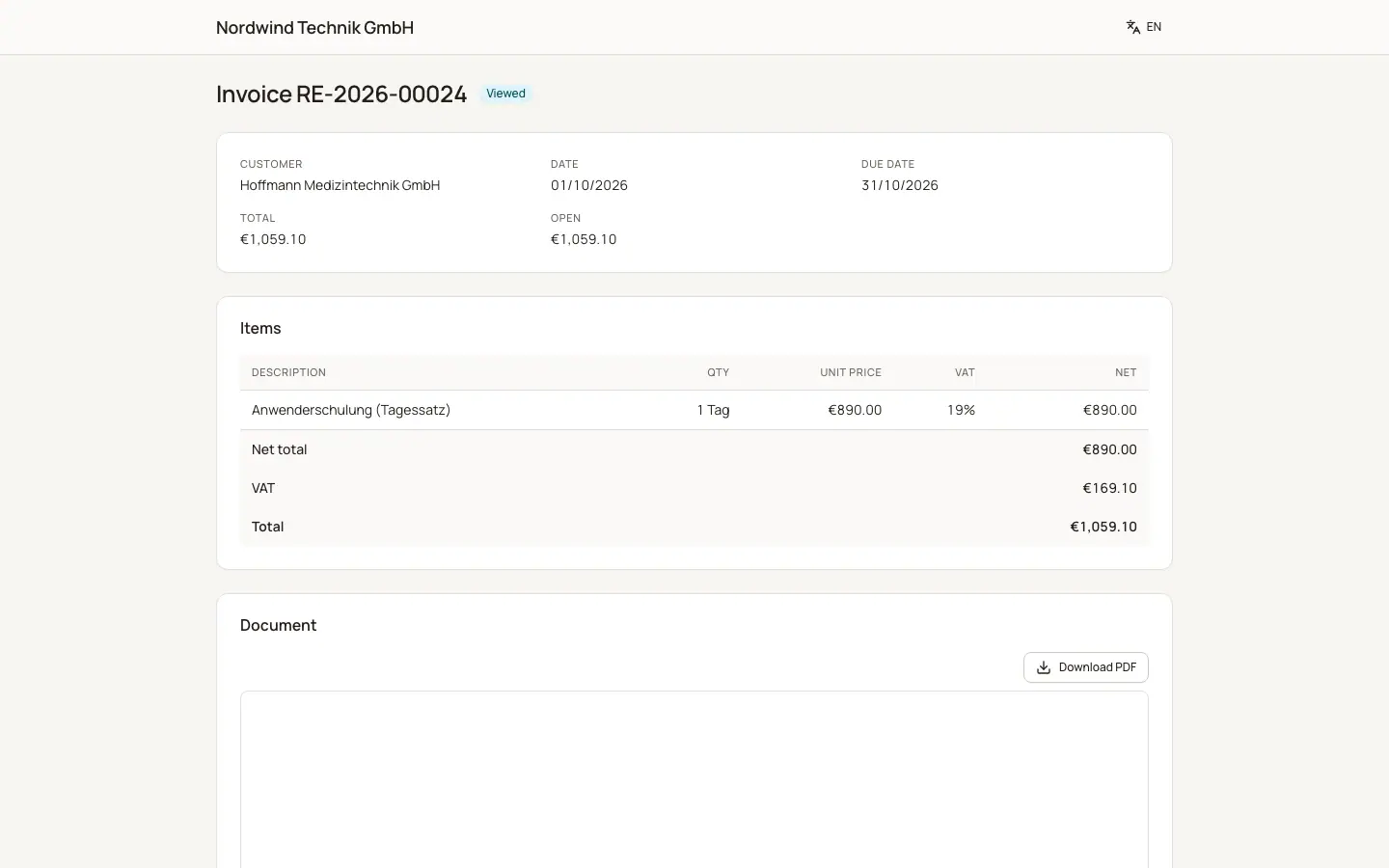
Your company name, the document kind (Invoice, Credit note, Quote, Order confirmation, Delivery note), customer, date, due date or validity, total and for invoices the open amount.
- Pay online
Invoices with an open amount show the payment buttons of your active providers.
- Your decision
Sent quotes show "Accept quote" (the customer enters their name and clicks "Accept (binding)") and Decline (with an optional reason).
- Items and PDF
The lines and a PDF preview with "Download PDF".
Good to know
- Opening an invoice link sets the invoice to Viewed.
- Drafts are never shown. An unknown link shows "This document was not found or the link is no longer valid."
- The links use the Base URL for public links from Sales settings.
Related
- Payment links and online payments
How customers pay online and how the payment is booked automatically.
- Sending documents by email
Email quotes, orders, delivery notes and invoices with PDF, electronic invoice and public link.