Writing a document: the editor
Every field of the editor for quotes, orders, delivery notes and invoices.
Quotes, orders, delivery notes and invoices share one editor. It has a Header card, a Line items card with live totals, and closing texts. Only drafts can be edited. The totals preview in the editor is a preview; the calculation of the server is binding.
Calculation rules: the line amount is quantity times unit price minus the line discount, rounded to cents. VAT is calculated once per tax rate on the sum of the lines, never per line, so the total always matches to the cent.
Who can use this
- Owner
- Admin
- Accountant
- Sales
Steps
1. Choose the customer
Pick the customer. Their currency, language, payment term and tax treatment become the defaults. Optionally pick a Contact.
2. Fill the header
Set the document date and the type specific dates (due date for invoices, Valid until for quotes, Delivery date for orders and delivery notes). Empty fields use the defaults.
3. Add lines
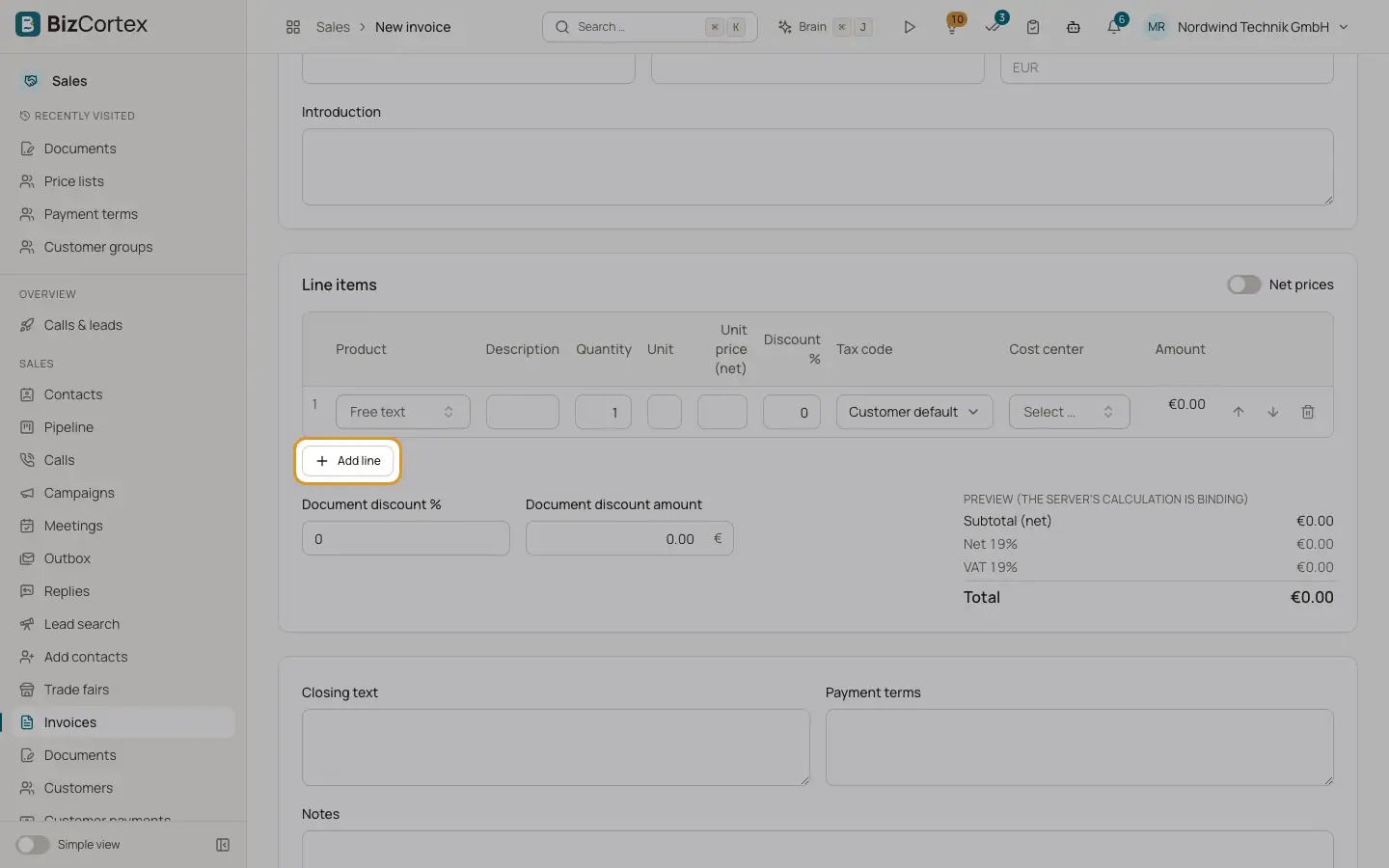
Click "Add line". Pick a product to fill description, unit and price from the price lists, or type a free text line. Enter quantity, unit price, line discount, tax code and cost center. Use the arrows to move lines and the bin to remove one.
4. Check totals and save
Review the subtotal, discount, net and VAT per rate and the total. Click Save.
Fields and options
- Customer, Contact
The customer is required. The contact receives emails and is printed on the document.
- Invoice type
Invoices only: Invoice, Down payment invoice, Partial invoice or Final invoice.
- Invoice date / Document date
Required.
- Due date
Invoices only. Empty = from the payment term.
- Valid until
Quotes only. Empty = the default validity from Sales settings (30 days unless changed).
- Delivery date
Orders and delivery notes.
- Payment term
Empty = Customer default.
- Date of supply, Service period from, Service period to
Invoices only. Empty date of supply = invoice date. Use the period for services over time.
- Down payment invoices to deduct
Final invoices only: tick the issued down payment invoices of this customer that this invoice settles.
- Customer order number
The reference of your customer.
- Leitweg ID / buyer reference
Printed and used in the electronic invoice. Required by German public authorities.
- Currency
Empty = the customer currency.
- Introduction
Text printed above the lines.
- Gross prices / Net prices switch
Choose whether you enter unit prices with or without VAT.
- Document discount % and Document discount amount
A discount on the whole document. The percentage is applied first, then the amount, spread over the tax rates.
- Line: Product, Description, Quantity, Unit, Unit price, Discount %, Tax code, Cost center
Description or product is required, quantity must be above 0. Tax code empty = Customer default (from the tax treatment).
- Closing text, Payment terms, Notes
Closing text and payment terms are printed below the lines. Notes are internal.
Tips
- The Brain assistant can fill the header and line items for you. You review the result and save it yourself.
Related
- Price lists
Customer, group and default prices per currency, with quantity breaks and validity.
- Invoice types: standard, down payment, partial and final
When to use which invoice type and how down payments are deducted.