The contact page
Everything about one contact: dial check, calls, pipeline, meetings, emails, research, timeline and legal basis.
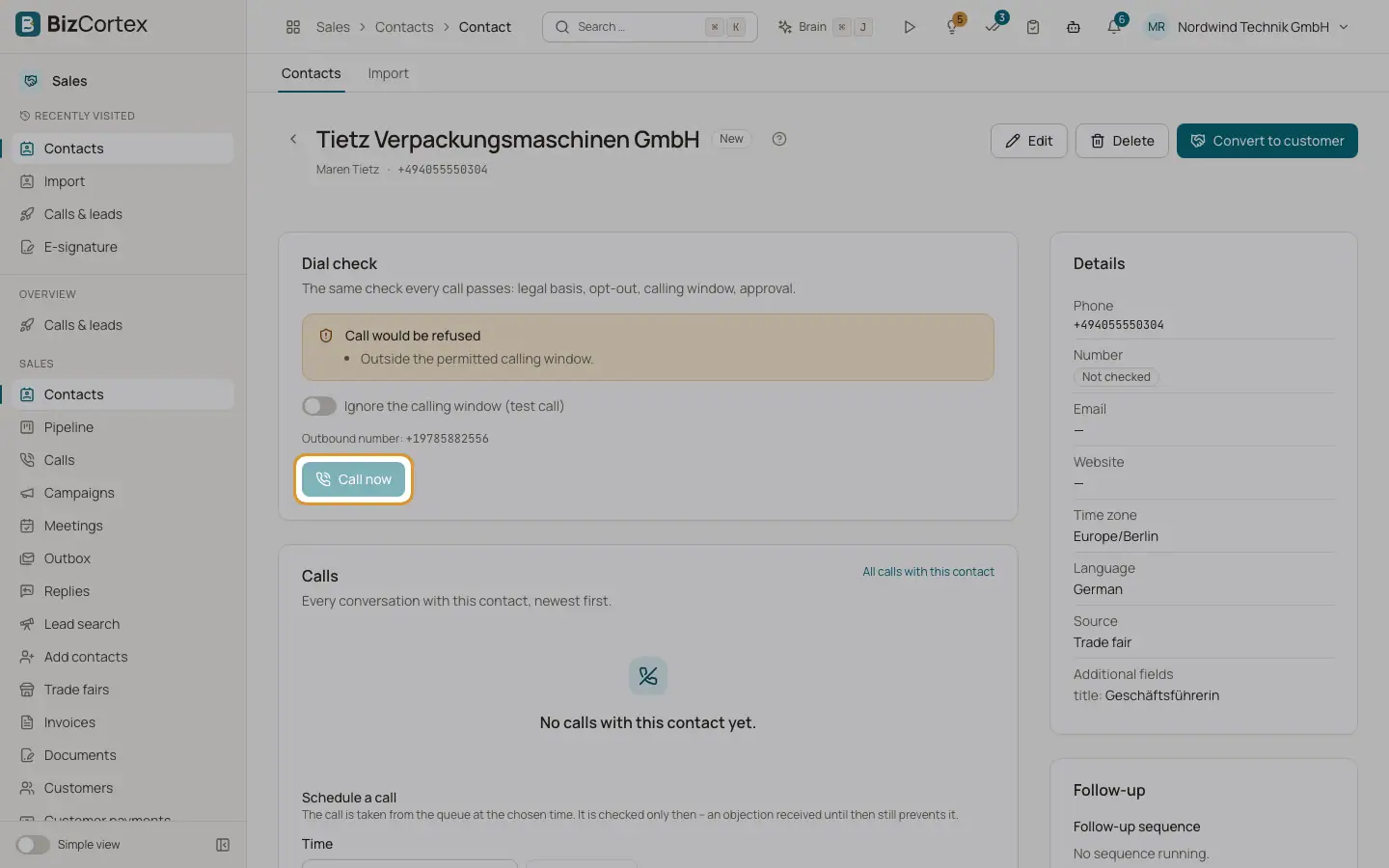
Click a contact in the list to open its page. The header shows the company, the contact person and the phone number. The buttons "Edit", "Delete" and "Convert to customer" need the CRM lead write permission.
The main column holds the cards Dial check, Calls, Pipeline, Meetings, Email history, Research, Timeline and "Connections & insights". The side column holds Details, Follow up, Legal basis (§7 UWG), Data upkeep, Connected contacts and Find similar companies.
Who can use this
- Owner
- Administrator
- Sales
- Compliance (audit only)
- Viewer
Steps
1. Edit the contact
Click "Edit" to change company, contact person, phone, email, website, time zone and language. Leave the time zone empty to derive it from the number.
2. Check whether a call is allowed
The card "Dial check" runs the same check every call passes: legal basis, opt out, calling window and approval. It shows "Call allowed" or "Call would be refused" with the reasons. With the calls dial permission you can pick the outbound number and click "Call now". Tick "Ignore the calling window (test call)" for a test.
3. Schedule a call
In the card "Calls", choose a time under "Schedule a call" and click "Schedule". The time is in the contact's time zone. The call is checked only when it is taken from the queue, so an objection received until then still prevents it. Scheduled calls are listed and can be cancelled.
4. Delete the contact
Click "Delete" and confirm. The contact is removed for good; opt outs on the block list stay in place. If retention obligations apply, the button is disabled and a box "Deletion blocked" lists the reasons and dates. Personal data can then be anonymised through a privacy request.
5. Read the timeline
The timeline lists everything that happened: calls, emails, SMS, meeting offers, meetings, scheduled calls, stage changes, consents, opt outs, sequences, contact data, email replies, enquiries, notetaker events, notes and conversion. Links open the call, the meeting or the customer.
Fields and options
- Details
Phone, email, website, time zone, language, source, number status (Not checked, Confirmed, Does not exist), email status (Not checked, Confirmed, Undeliverable, Marked as spam), last confirmed, customer in Sales, other channels and additional fields.
- Connections & insights
What earlier conversations taught: precedents (objections from similar contacts and the answer that worked), expected incumbent vendors and connected contacts.
- Data upkeep card
Open issues with the contact data. "Check contact" schedules a check: "Confirm the data", "Find a new number" or "Find the contact person".
Related
- Convert a contact to a customer
Create or link a customer in Sales and optionally a quote draft.
- Legal basis and consent
Document the reason to call (§7 UWG) and record express consent for email.
- Calling rules: the dial check
The checks every call passes: legal basis, opt outs, calling hours, attempts, countries and approval.
- Similar companies and contact research
Find companies like an existing lead, and the public research behind a personalised opening.