Exports and imports for authorities and auditors
Create the statutory audit and VAT files of your country and import accounting data from other software.
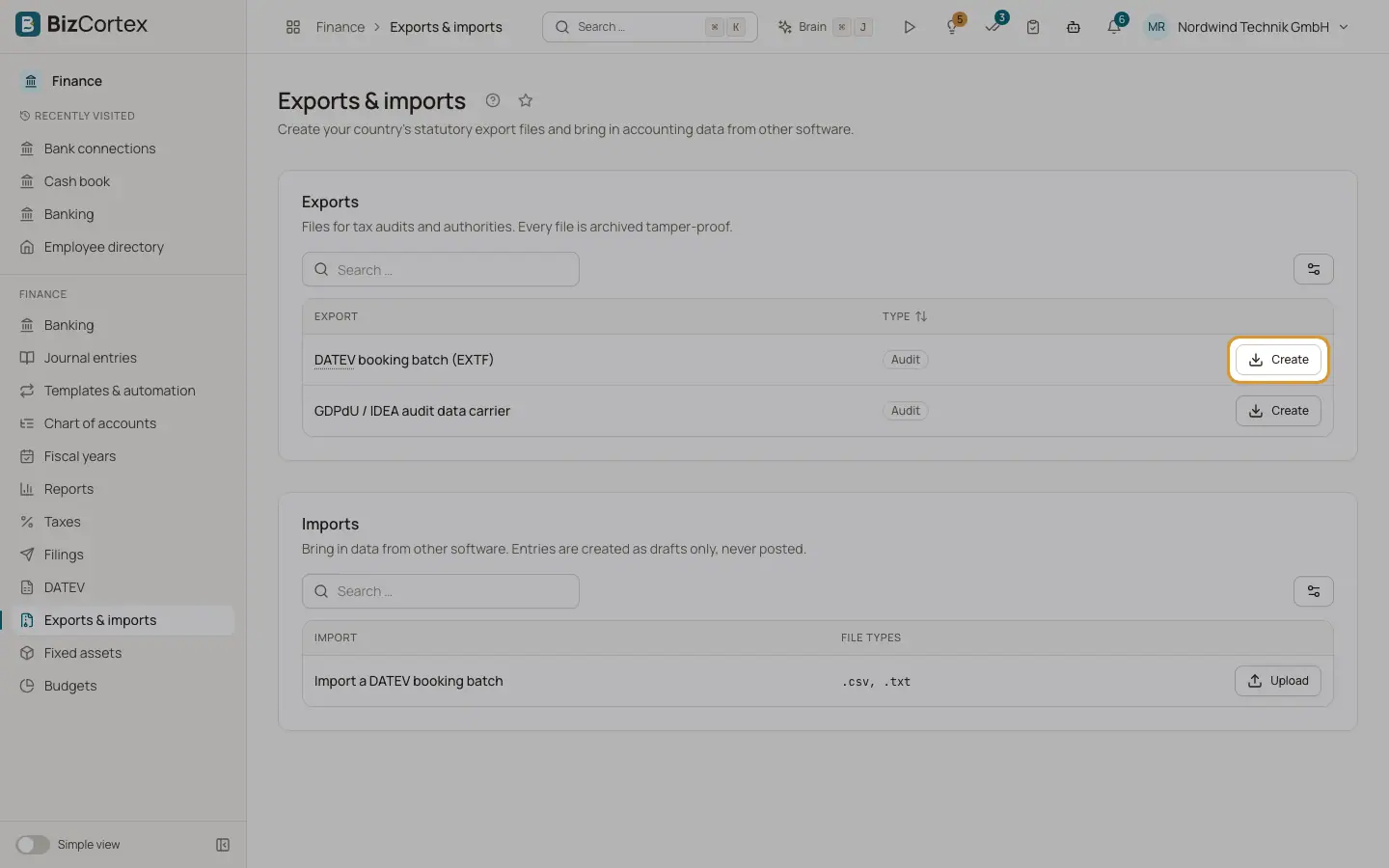
Open the Finance app and click "Exports & imports" in the sidebar. The page lists only the files of the country of your company. The card "Exports" holds files for tax audits and authorities; every file is archived tamper proof. The card "Imports" brings in data from other software; entries are created as drafts only, never posted.
Each export has a type: Audit, VAT, Payroll or Master data.
Who can use this
- Owner
- Admin
- Accountant
- Anyone with the Audit exports write permission (to create files or import)
- Viewer (read only)
Steps
1. Create an export
Click "Create" in the row of the export. Choose the period ("From" and "To", or the "Year" for annual files). Click "Create and download". The file is downloaded and archived write once, together with the result of its own checks (for example the XSD validation).
2. Import a file
Click "Upload" in the row of the import and choose the file. The allowed file types are shown. The result lists "Journal drafts created", "Accounts created" and "Customers and vendors created", plus warnings. Click "Open the drafts" to review and post the entries.
Fields and options
- Germany
DATEV booking batch (EXTF); GDPdU / IDEA audit data carrier for the Z3 data access of a tax audit (index.xml plus CSV tables). Import: DATEV booking batch.
- Austria
SAF T AT 1.01 audit file, validated against the official XSD; BMD NTCS booking export (CSV) for the tax adviser; VAT return U30 as FinanzOnline XML or sent through the FinanzOnline web service; EC sales list U13 as FinanzOnline XML or through the web service. Imports: BMD bookings and SAF T AT.
- Switzerland
Journal as CSV and Excel; VAT return as eCH 0217 XML for the ESTV ePortal (effective or net tax rate method); VAT annual reconciliation (eCH 0217); VAT return worksheet (CSV); supplier payments as pain.001 Swiss Payment Standards; Swiss direct debits LSV+, BDD and CH DD (pain.008). Import: bookings from Banana, bexio, Abacus and similar CSV, TXT or XLSX exports.
- Denmark
SAF T Financial DK 1.0 and 2.1 (2.1 is required for registered bookkeeping systems from 1 January 2027); VAT return worksheet as CSV and PDF; EC sales list (EU salg uden moms) for TastSelv Erhverv; a check of postings without voucher. Import: SAF T DK from Dinero, Billy and other Danish systems (up to 200 MB).
- Spain
Libro Diario journal (CSV); VAT record books in the AEAT XLSX format; Form 303 as AEAT import file and as worksheet; Form 349 EC sales list as AEAT file and worksheet; Form 390 annual summary, Form 111 and Form 115 as worksheets. Import: journal CSV from A3, ContaPlus, Sage and others.
- France
FEC audit file (18 fields, tab separated, file name SIRENFECYYYYMMDD.txt) with structural checks; CA3 and CA12 VAT return worksheets (CSV and PDF); EU services list (DES) and EC sales list for goods, each as worksheet and as XML import file for douane.gouv.fr; electronic reporting summary for B2C and international transactions. Import: FEC from Sage, Cegid, EBP, Pennylane and others.
- Norway
SAF T Financial NO 1.30 with grouping codes, validated against the official XSD; VAT return (mva melding XML). Import: SAF T Financial from Tripletex, Fiken, Visma and others (up to 100 MB).
- Sweden
SIE 4 export (type 4E with chart, balances, results and verifications); VAT return as eSKD file; EC sales list (Periodisk sammanställning). Import: SIE 4 from Fortnox, Visma, Bokio and others.
Tips
- The VAT return page of your country links straight to the matching export with the period filled in.
- For a German tax audit, the GDPdU data carrier is also available on the DATEV page.
Good to know
- Imports never post anything. They create journal drafts and master data (accounts, customers, vendors) only.
- Imports accept files up to 20 MB, unless noted otherwise above.
- Some files are marked as needing review because their mapping has not been signed off by a local tax professional yet (for example the BMD export, Spanish Forms 111, 115 and 390, the French DES and EC sales lists and the electronic reporting summary). Check them with your adviser.
- An export with no data is refused with "The export is empty". The end of the period may not be before the start.
- Most of these files are uploaded by you in the portal of the authority. BizCortex records the outcome under Filings when the file is put there.
Related
- How country packs work
The country of a company is chosen once and decides its accounts, taxes, files, payroll and deadlines.
- Document archive (GoBD)
Invoices, receipts and exports stored unchangeably with checksum and retention period.
- VAT return in other countries
The national VAT return for companies outside Germany, with boxes, review hints and export files.
- DATEV export, import and connection
Hand bookings and receipts to your tax adviser as DATEV files or directly through the DATEV connection, and import DATEV booking batches.
- Filings and connections
One list of everything BizCortex sends to tax offices, networks, banks and your tax adviser, with status, receipt and history, plus the connection settings.