Reconciling bank transactions
Match each bank line with an invoice, a bill, a journal entry or an account, using scored suggestions.
Reconciliation connects every bank line with what it pays for. An incoming payment usually settles a customer invoice. An outgoing payment usually settles a supplier bill. Other lines, such as bank fees, are booked directly to an account.
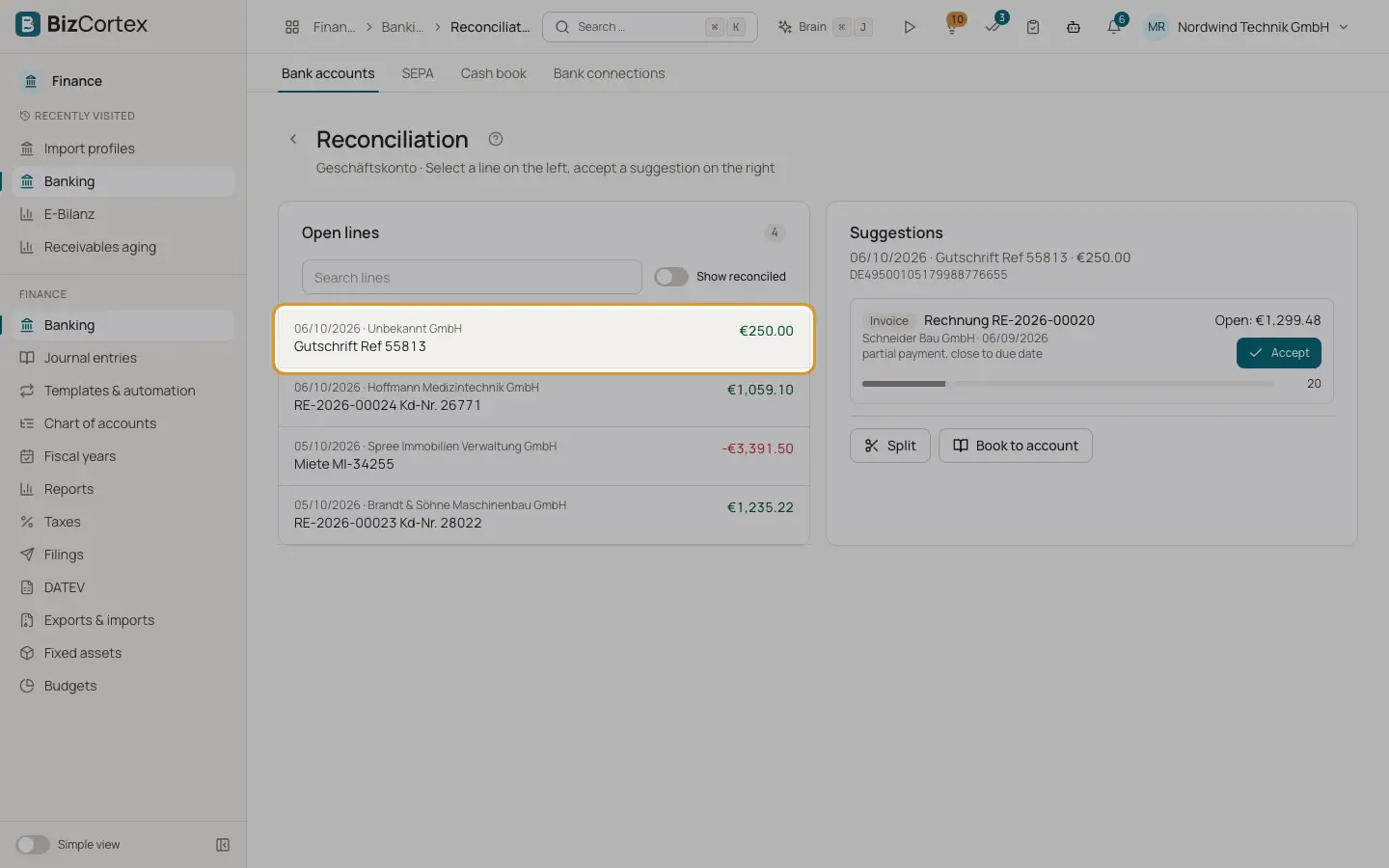
Open a bank account and click "Open reconciliation". The workspace has two halves: on the left the list "Open lines", on the right the "Suggestions" for the selected line.
Who can use this
- Owner
- Admin
- Accountant
- Anyone with the Banking transaction write permission
Steps
1. Select a line
Click a line in the left list. Use "Search lines" to filter by text. Switch on "Show reconciled" to include lines that are already done.
2. Read the suggestions
The right side lists candidates with their type (Invoice, Bill or Journal entry), the open amount and a score bar. The best match is at the top.
3. Accept a suggestion
Click "Accept". The line is reconciled for its full amount. For an invoice or bill, a payment is recorded on the document, so its status changes to partly paid or paid.
4. Split or book
If no suggestion fits, click "Split" to spread the line over several documents or accounts, or "Book to account" to post it to one counter account.
5. Check what was matched
For a reconciled line, the right side shows "Matches" instead of suggestions. Reversed matches are marked as reversal.
Fields and options
- Invoice suggestions
Only for incoming money. Customer invoices with status sent, viewed, partly paid or overdue.
- Bill suggestions
Only for outgoing money. Supplier bills with status received, partly paid or overdue.
- Journal entry suggestions
Posted journal entries that touch the ledger account of this bank account and are not linked to another bank line.
- Score
Points for: the amount equals the open amount (highest weight); the document number appears in the purpose (exactly or very similar); the counterparty name matches the customer or vendor; the payment date is close to the due date. A payment before the document date lowers the score. An amount higher than the open amount is never suggested.
Tips
- Ask customers to put the invoice number in the payment reference. An exact number in the purpose adds many points to the score.
- Up to 50 suggestions can be loaded per line; the workspace shows the best ones.
Good to know
- An invoice can only be matched to incoming money and a bill only to outgoing money.
- The matched amount may not exceed the open amount of the invoice or bill.
- A journal entry that is already linked to another bank line cannot be linked again.
Related
- Recording customer payments
Post money received, allocate it to invoices, grant cash discounts and keep the rest as credit.
- Bill payments and cash discount
Record or reverse a payment and take cash discounts.
- Splitting a bank line and booking to an account
Spread one bank line over several invoices, bills or accounts, or post it straight to a counter account with VAT.
- Undoing a reconciliation
Reverse direct postings and remove links of a reconciled bank line.
- Matching rules
Rules categorise recurring bank lines and can post them to a counter account automatically.