DATEV export, import and connection
Hand bookings and receipts to your tax adviser as DATEV files or directly through the DATEV connection, and import DATEV booking batches.
DATEV is the software most German tax advisers use. Open the Finance app and click DATEV in the sidebar. This item is shown only for German companies; companies in other countries use Exports and imports.
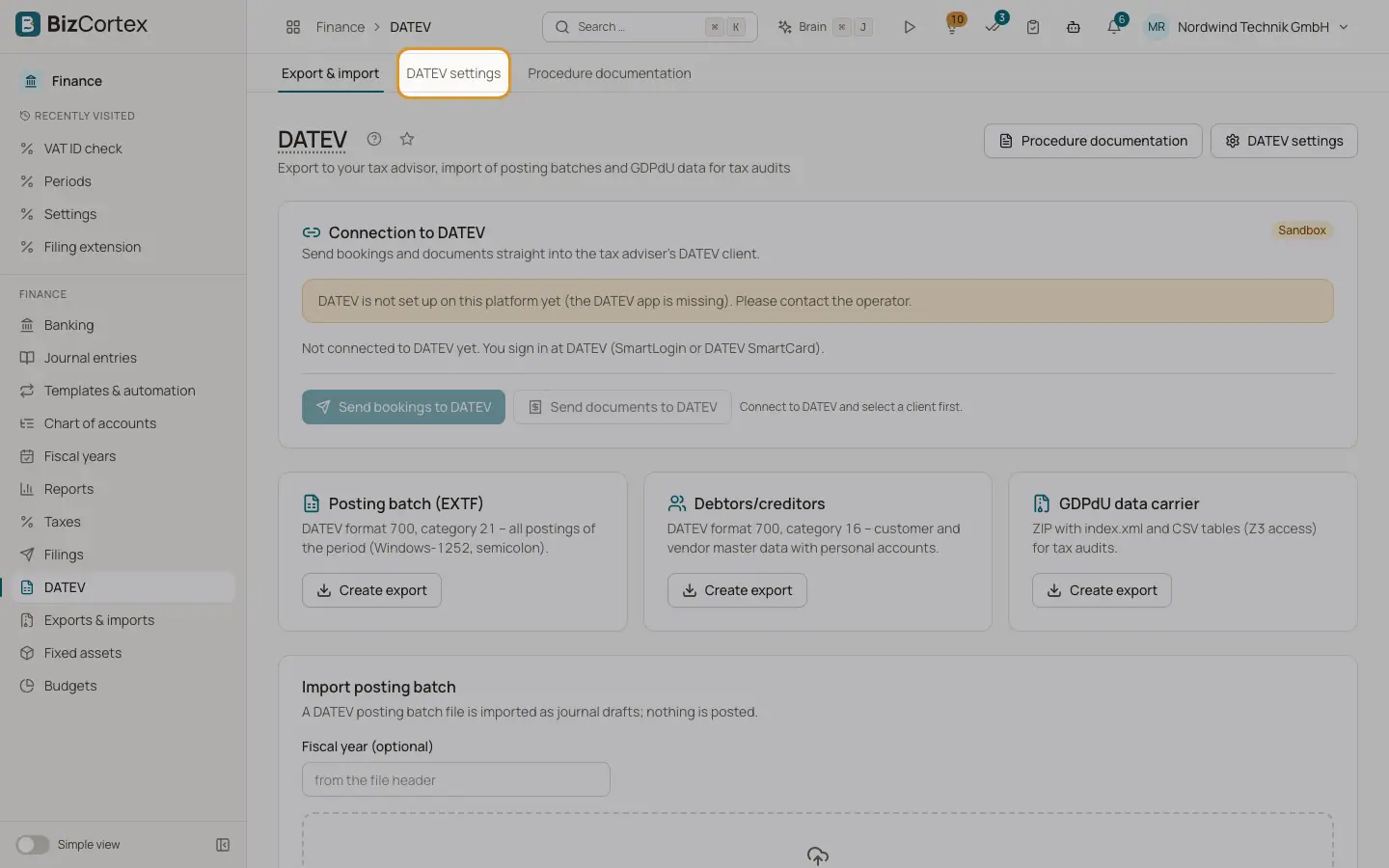
The DATEV page has the card "Connection to DATEV", three export cards, an import card, and buttons for "Procedure documentation" and "DATEV settings".
Who can use this
- Owner
- Admin
- Accountant
- Anyone with the Accounting DATEV write permission (import, settings)
- Anyone with the Accounting DATEV approve permission (to send to DATEV)
Steps
1. Set up the header values
Open "DATEV settings" and enter the consultant number, the client number, the G/L account length and the fiscal year start. These values go into the header of every DATEV file.
2. Export the posting batch
On the card "Posting batch (EXTF)", click "Create export", choose the period and click download. You get all postings of the period in DATEV format 700, category 21 (Windows 1252, semicolon separated, decimal comma).
3. Export debtors and creditors
On the card "Debtors/creditors", click "Create export". You get customer and vendor master data with personal accounts (DATEV format 700, category 16).
4. Export the GDPdU data carrier
On the card "GDPdU data carrier", click "Create export". You get a ZIP file with index.xml and CSV tables (accounts, postings and posting lines) for the data access of a tax audit.
5. Import a posting batch
In "Import posting batch", optionally enter the "Fiscal year (optional)" (otherwise it comes from the file header) and upload the EXTF file. The result shows how many rows were read and how many drafts were created. Click "Go to journal drafts" to review and post them. Rows that could not be imported are listed with row number and error.
6. Connect to DATEV
Owners and admins click "Connect to DATEV" and sign in at DATEV with SmartLogin or a DATEV SmartCard. Then click "Select client" and choose the client released for your sign in. Check the "Fiscal year start (DD.MM.)".
7. Send bookings to DATEV
Click "Send bookings to DATEV", choose the period and click "Check". The check lists errors and warnings (field lengths, characters, document number, BU key, account lengths, dates, amounts). When there are no errors, click "Create submission". Approval and sending happen under Filings.
8. Send documents to DATEV
Click "Send documents to DATEV", choose the period and click "Check". The archived invoices and receipts of the period are packed with their document number. Click "Create submission"; large sets are split into several batches.
Fields and options
- Consultant number
1001 to 9999999.
- Client number
1 to 99999.
- G/L account length
4 to 8 digits.
- Debtors from, Creditors from
First personal account numbers, at least 10000. By default debtors start at 10000 and creditors at 70000.
- Dictation code
At most 2 characters.
- Use personal accounts (debtors/creditors)
Writes customer and vendor personal accounts instead of the collective receivable and payable accounts.
- Lock postings (Festschreibung)
Marks the exported postings as locked in DATEV. On by default.
- Personal accounts
The table on the settings page lists assigned debtor and creditor numbers. Click "Assign missing numbers" to give every customer and vendor without a number one. Assigned numbers are never reused.
Tips
- The page "Procedure documentation" offers a GoBD procedure documentation template. Click "Download as Markdown" and complete the placeholders in square brackets.
- Documents that were already sent, have an unsupported file type, or are larger than 20 MB are not sent; the check tells you why. Supported are PDF, JPEG, PNG, TIFF and XML.
Good to know
- A posting batch must not span two fiscal years.
- The DATEV import accepts EXTF CSV files in Windows 1252 or UTF 8 up to 20 MB, and creates journal drafts only. Nothing is posted until you post the drafts.
- If the platform has no DATEV app set up, the connection card says "DATEV is not set up on this platform yet". If the sign in expired or was revoked, click "Reconnect".
- While the platform uses the DATEV sandbox, filings in test mode go to the DATEV sandbox and live mode is blocked.
Related
- Filings and connections
One list of everything BizCortex sends to tax offices, networks, banks and your tax adviser, with status, receipt and history, plus the connection settings.
- Exports and imports for authorities and auditors
Create the statutory audit and VAT files of your country and import accounting data from other software.
- Tax codes
View and maintain the VAT codes with their rate, category, return boxes, DATEV key and OSS country.